
LIMA – Logistics Integrated Management Application For Ships

Simplify Logistics and Warehouse Management for your fleet
What is LIMA?
LIMA is a Logistics and Warehouse Management System specialized for the Cruise Industry that helps facilitate the end-to-end logistics process of New Building and Dry Dock projects, from Purchasing to Loading onboard the ship. LIMA includes more than ten years of user feedback and lessons learned in New Build and Dry Dock projects.
What is the goal of LIMA?
The goal of Lima is to ensure the timely delivery of goods by keeping track of shipment status, responsible parties, and goods location in real time.


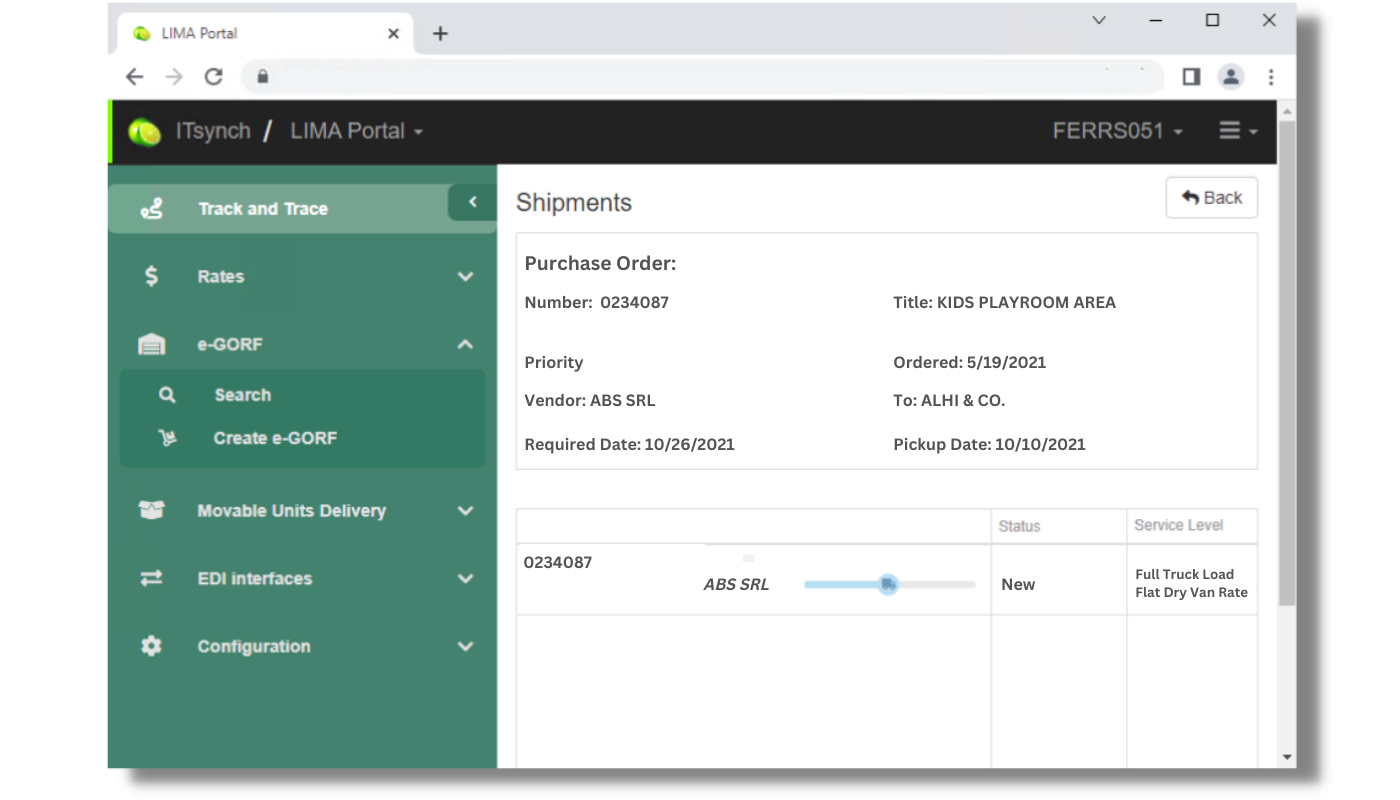

Always know where your goods are.
Real-time tracking
Track all your goods from initial shipment to delivery from anywhere.
Better inventory organization
Organize your inventory with more insights and save time.
Efficiently manage inventory
Get in control and manage your inventory with updated and detailed information.
Explore Logistic Management features that help you reduce costs, improve productivity, and have better control over inventory.

Purchase Orders Import and Creation
Easily import and manage Purchase Orders created in external purchasing systems or create dummy Purchase Orders to track items without a PO.
Comprehensive Shipment Information
View all information related to shipments, including the ability to manually create, modify, or delete data. You can also filter shipments by status (e.g., "in transit," "hot," "hazmat") or by inbound or outbound shipments.

Automatic Weight Calculation
Weight automatically calculated from AMOS Stock Type.
Track and Trace
Web Track & Trace for Project Managers and Crew, using “Google like” search keywords they are familiar with including PO#, PO Title, Spare Part #, Spare Part Name and more.
Movable Units
Combine several items into a single unit to facilitate their movement and transportation from one place to another instead of moving each item separately. Make this process manually or automatically.

Automatic Alerts and Reports
Get automatic email alerts for missed deliveries, incoming shipments, and e-GORF requests. You will also automatically receive reports such as the Warehouse Activity Report, A/P Ready 2 Pay, Finance Shipments Cost Summary, and more via email.
Explore Warehouse Management features that help you enhance stock visibility, maximize storage space, and improve record keeping.
Multiple Warehouses Support
EDI support with 3PL Warehouse Management Systems and Transport Management Systems (TMS).

Barcode Scanning
View complete information about items with easy barcode scanning.
Get information about movable unit content by scanning its barcode, which can be used to control content and move unit from one location to another.
Get information about movable unit content by scanning its barcode, which can be used to control content and move unit from one location to another.
Warehouse Configuration
View, create, modifify and delete data. Use Hierarchical Locations support and
Mobile Inbound / Outbound WH process.
Mobile Inbound / Outbound WH process.

Warehouse Inventory View
3PL WH inventory visibility through EDI with 3PL TMS. View Inventory by WH or Consolidation center.

E-GORF - Electronic Goods Out Request Form
Request for goods to be extracted from the warehouse and sent to their final destination using the web e-GORF workflow support for project managers and crew.
Automatic Alerts and Reports
Get automatic email alerts for missed deliveries, incoming shipments, and e-GORF requests. You will also automatically receive reports such as the Warehouse Activity Report, A/P Ready 2 Pay, Finance Shipments Cost Summary, and more via email.


